
VHD Tool++
VHD Tool++ is a program for managing the virtual disk images of IODD devices. It runs on Windows only. Besides booting from a virtual CD-ROM drive, the IODD can boot from a virtual USB flash drive and from Windows To Go; both use VHD files.
Beyond creating VHD files, the program contains maintenance functions that keep ISO files, VHD files and disk images compatible with what the IODD requires for booting and mounting.
Download from the manufacturer
VHD Tool++: download from the manufacturer
(in English, opens in a new window).
The link opens the folder vhd_tools of the manufacturer's download directory. If the page does not load, try again later or contact us.
Link checked on 23 November 2026
Overview
- Virtual drives: According to the description of the program, up to 6 virtual devices can be used at the same time. The manuals of the devices name up to 5.
- Drive types: A virtual drive belongs to one of four types: fixed disk (Fixed), removable disk (Removable), floppy drive (FDD) or optical drive (ODD).
-
Languages: The program is available in English, Korean and Chinese. The file
VHD_Tool++(en).batstarts the English interface directly.
Program window
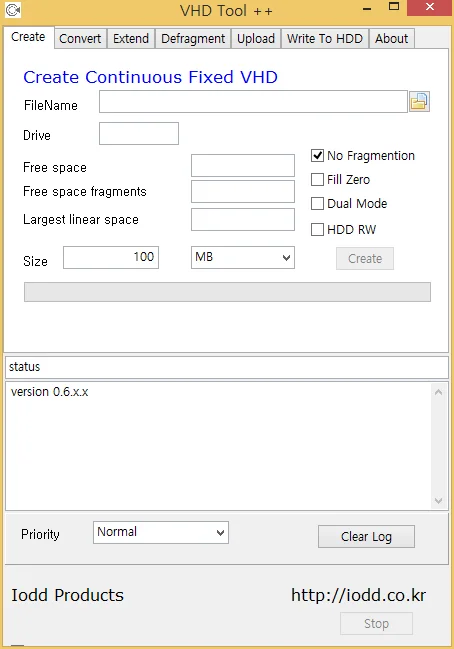
Create (create a VHD file). The program window in the screenshot shows “version 0.6.x.x”.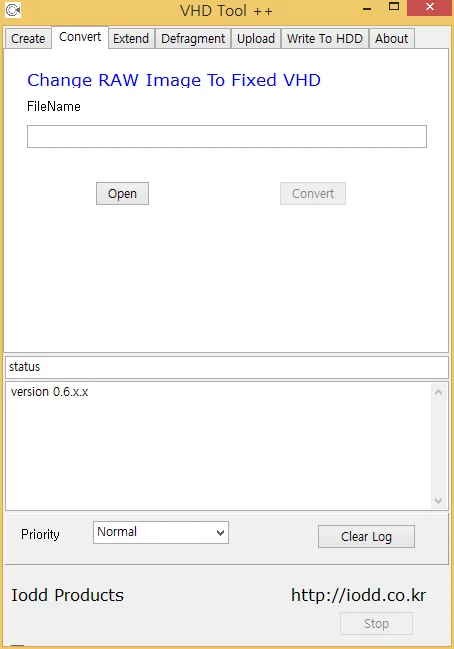
Convert (convert a disk image into a VHD file).
Extend (enlarge a VHD file).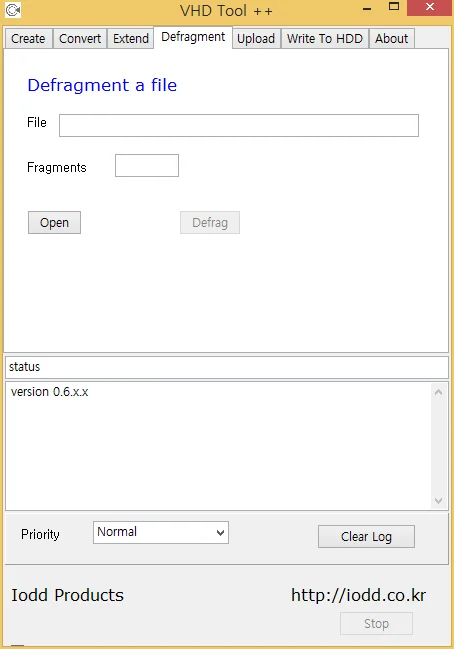
Defragment (defragment a single file).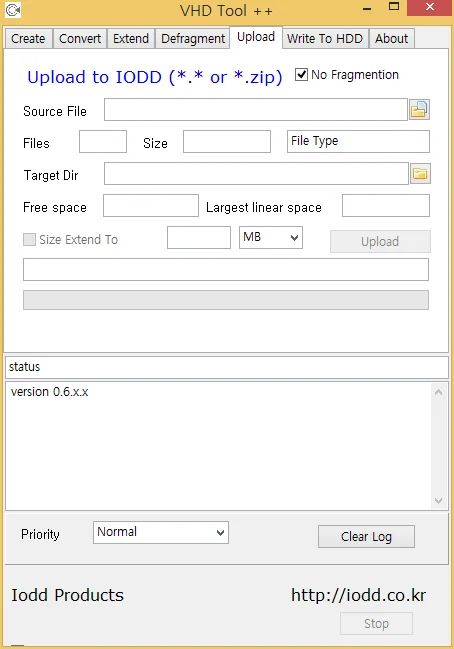
Upload (copy a file to the IODD).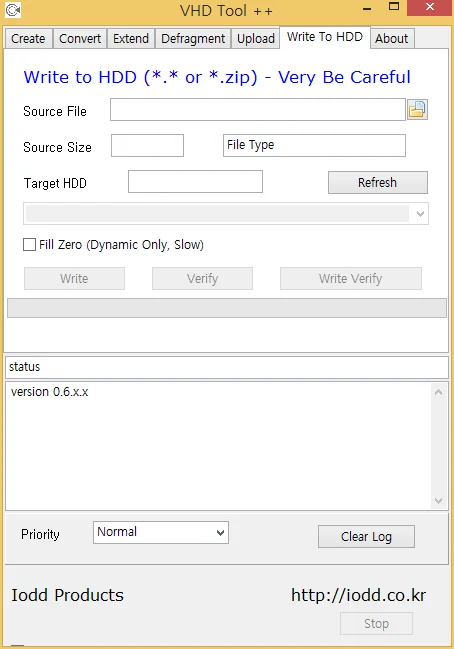
Write To HDD (write an image to the drive, for experts only).Functions
Use the functions beyond Create when you need to convert a raw image, enlarge an existing VHD file, remove fragmentation from a file, or copy an image to the IODD without making it unusable for mounting. The steps for creating a VHD file are described in Creating a VHD file (VHD Tool++).
Create
Creates fixed-size VHD files directly on the IODD drive. The files are created completely unfragmented. This is essential, because the IODD can mount a VHD file only if it is unfragmented.
Convert
Converts an ordinary raw image of a disk (disk dump) into a fixed-size VHD file that the IODD can use.
Extend
Increases the size of an existing fixed-size VHD file. The stored data is kept.
Defragment
Analyzes and defragments a single file on the IODD, so that it is contiguous (0 fragments), as the virtual drive function requires.
Upload
Copies a file from the PC to the IODD and prevents it from becoming fragmented while it is written.
Write To HDD (experts only)
Warning
Write To HDD permanently erases all data on the target drive, that is, on the internal drive of the IODD. Back up your data first. The manufacturer recommends this function only for advanced users who work with raw disk images.
Writes an image file to the drive sector by sector, as a physical copy.
File systems: According to this page of the manufacturer's guide, the function supports NTFS only. A second place in the manufacturer's guide names NTFS and exFAT.
Installation
- Download the ZIP package from the manufacturer.
- Extract the ZIP archive into a folder on your PC. For best compatibility, use a folder path that consists of English characters only and contains no spaces.
- Start
VHD_Tool++.exe, or use one of the supplied.batfiles to start the program in a particular language.
Version history
The manufacturer's guide lists these versions:
- v0.7.0.10 (29 July 2021): support for the file systems NTFS, exFAT and FAT added.
- v0.6.0.5 (20 June 2015): first support for NTFS.
Note
The list in the manufacturer's guide ends in 2021. It does not tell you which version the download directory offers today. For the Duress PIN, the manufacturer requires v0.9.0.10 or later.
Older devices: file names that control the mode
On the older models IODD 2531 and 2541, the file name decides how a virtual drive behaves and whether the physical drive is write-protected by the hardware.
File extensions:
-
.VHD: mounted as a fixed USB disk. -
.RMD: mounted as a removable USB disk.
Additions to the file name set the mode in which the device connects, for example Win2Go&DW.VHD:
- Plain name, for example
Win2Go.VHD: The device starts in CD-MODE, on the 2541 in ODD-MODE. - Addition
&D, for exampleWin2Go&D.VHD: The device starts in Dual-Mode. The physical drive is write-protected by the hardware. - Addition
&DW, for exampleWin2Go&DW.VHD: The device starts in Dual-Mode. The physical drive can be written to.
These additions to the file name do not apply to the ST400, LK100 and MINI PRO.
Not solved? Tell us your model and the message on the display. Go to contact form
Translation of the official IODD guide, checked against the original on 23 November 2026.
If they differ, the original English pages apply: Advanced VHD Tool++ Functions (new window) VHD Tool++ (new window)