
User menu (users 1 to 4)
On this page (3)
The user menu is for standard access without administrator rights on IODD devices with AES256 hardware encryption, including the ST400, MINI PRO and LK100. A user PIN unlocks the encrypted drive with only the rights the administrator has granted.
Users 1 to 4 can manage their own security settings, for example change or delete their password, provided the administrator has given them the rights to do so.
Note
The ST300 has no encryption.
Note
Menu names are given here as the device shows them in English. From firmware 0.8.1.2 onwards, the device can also display German and French; the names then differ.
Note
Menu not visible. If you do not see the menu Encryption (encryption) after pressing the Menu key, the administrator has not given you the right to change or delete your password.
Opening the menu
Press the Menu key (⚙) on your IODD.
-
Go to
Encryptionand select it.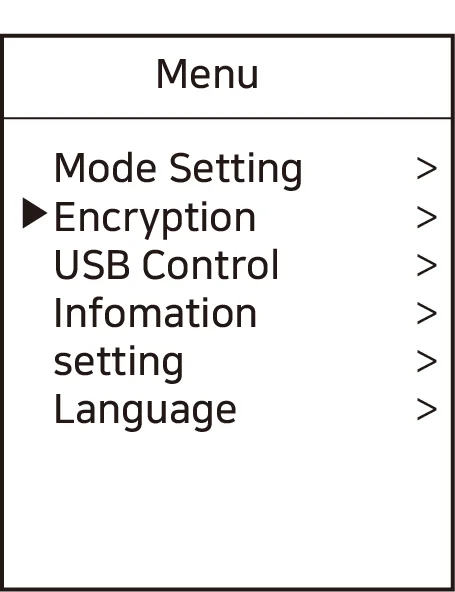
The main menu as a user sees it, with the entry Encryption(encryption).
Available functions
Caution
Deleting your password (Del Password). If you use Del Password, you lose access to the encrypted drive immediately. You then have to ask the administrator to assign you a new user profile and password.
Which entries are active depends on the rights the administrator has given you.
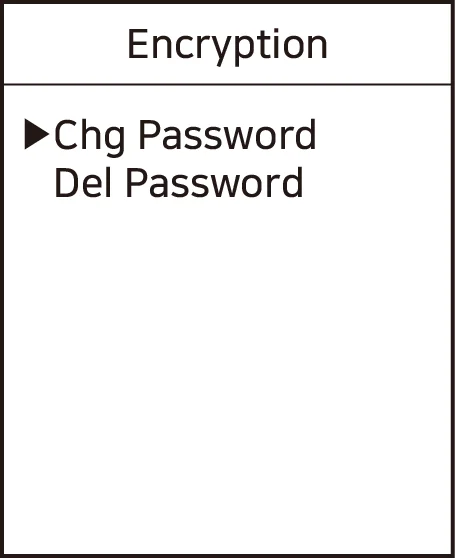
Encryption of a user with the entries Chg Password (change password) and Del Password (delete password). Which entries appear depends on your rights.-
Chg Password: Users 1 to 4 can change their own login password themselves. -
Del Password: Users 1 to 4 can delete their own account and password from the device.
Caution
The administrator keeps control. Even if a user has the right to manage their own password, the administrator keeps full control and can change or delete any user's password at any time in admin mode. See Managing users.
Recommendations
Note
Changing passwords. Changing your password from time to time is recommended. When you change it, remember your identification digit (1 to 4). You must enter it as a prefix every time you log in.
Not solved? Tell us your model and the message on the display. Go to contact form
Translation of the official IODD guide, checked against the original on 23 November 2026.
If they differ, the original English pages apply: User (new window) User menu (Encryption) (new window)